Recently in one of our project the requirement is to insert element within existing XML which is a column(XML Data type) in a table. In other words we have to insert dynamic xml in another xml. I hear the similar requirement in most of the forums...
We can use one of the XML DML operation "INSERT" - Inserts one or more nodes identified by Expression1 as child nodes or siblings of the node identified by Expression2.
Using this Insert operation we can insert only a static nodes as shown below:
-- Declare Local Variables
DECLARE @MainXML XML
DECLARE @NewXML XML
-- Sample XML with employee information
SET @MainXML = '<employees>
<employee>
<fname>John</fname>
<lname>V</lname>
<desig>SSE</desig>
</employee>
<employee>
<fname>Pascal</fname>
<lname>J</lname>
<desig>SE</desig>
</employee>
<employee>
<fname>Naveen</fname>
<lname>M</lname>
<desig>Engineer</desig>
</employee>
</employees>'
-- Inserting static xml
SET @MainXML.modify('insert (<employee><fname>Test</fname></employee>) as last into (/employees)[1]')
-- To verify the reault
select @MainXML
Now if we want to insert an XML which is available within the local variable @NewXML:
-- Assigning the sample xml to the local variable
SET @NewXML = '<employee><fname>Test</fname></employee>'
Now if we try to insert this xml from the local variable using sql:variable:
SET @MainXML.modify(' insert {sql:variable("@NewXML")} as last into (/employees)[1]')
We will get an error message indicating:
XQuery [modify()]: An expression was expected
In SQL Server 2005 the work around will be:
1. Dynamic Query
2. Combination of the XML DML Operations
Here I am not concentrating on the Dynamic Query approach as it is pretty simple to implement and it may not be a best approach when compared to other.
Following set of queries using DML operation, we can insert XML data from a local variable:
-- Appending both the Main XML and New XML to insert into Main XML with a root node
SET @MainXML = '<root>' + CAST(@MainXML AS VARCHAR(MAX)) + '<new>' + CAST(@NewXML AS VARCHAR(MAX)) + '</new>' + '</root>'
-- Moving employee element from new element to main xml as part of employees element
SET @MainXML.modify(' insert (//new/employee) as last into (/employees)[1]')
-- Deleting the new element
SET @MainXML.modify(' delete (//new)')
-- Steps to move employee element to the end and to delete the root element
SET @MainXML.modify(' insert (//root/employees) after (/root)[1] ')
SET @MainXML.modify(' delete (/root)')
-- Selecting the xml for final verification
SELECT @MainXML
In Summary following is the sample Script in SQL Server 2005 to insert a dynamic XML into another XML:
DECLARE @MainXML XML
DECLARE @NewXML XML
SET @MainXML = '<employees>
<employee>
<fname>John</fname>
<lname>V</lname>
<desig>SSE</desig>
</employee>
<employee>
<fname>Pascal</fname>
<lname>J</lname>
<desig>SE</desig>
</employee>
<employee>
<fname>Naveen</fname>
<lname>M</lname>
<desig>Engineer</desig>
</employee>
</employees>'
SET @NewXML = '<employee><fname>Test</fname></employee>'
SET @MainXML = '<root>' + CAST(@MainXML AS VARCHAR(MAX)) + '<new>' + CAST(@NewXML AS VARCHAR(MAX)) + '</new>' + '</root>'
SET @MainXML.modify(' insert (//new/employee) as last into (/employees)[1]')
SET @MainXML.modify(' delete (//new)')
SET @MainXML.modify(' insert (//root/employees) after (/root)[1] ')
SET @MainXML.modify(' delete (/root)')
SELECT @MainXML
These many steps are not required for SQL Server 2008 as it supports to insert the dynamic XML directly into another XML. Following is the sample script for SQL Server 2008:
DECLARE @MainXML XML
DECLARE @NewXML XML
SET @MainXML = '<employees>
<employee>
<fname>John</fname>
<lname>V</lname>
<desig>SSE</desig>
</employee>
<employee>
<fname>Pascal</fname>
<lname>J</lname>
<desig>SE</desig>
</employee>
<employee>
<fname>Naveen</fname>
<lname>M</lname>
<desig>Engineer</desig>
</employee>
</employees>'
SET @NewXML = '<employee><fname>Test</fname></employee>'
-- One statement in SQL Server 2008 to do all the operation what we mentioned above for SQL Server 2005
SET @MainXML.modify(' insert {sql:variable("@NewXML")} as last into (/employees)[1]')
select @MainXML
This we implemented in most of our applications, hope it will be useful to most of the folks...
Showing posts with label XML. Show all posts
Showing posts with label XML. Show all posts
Tuesday, August 18, 2009

Monday, July 27, 2009
How to get deep nested elements in SQL Queries using FOR XML PATH
Recently in one of the forums I came across this question.
How can we have deep nested elements in the xml when we are using FOR XML PATH in a SQL Query.
For example the following query
SELECT 'value' AS 'orderdatabase/allorders/customer/information/orderaddress/shippingaddress/address1/home/address1/blahblahblahblahblahblahblahblah'
FOR XML PATH('')
will give an error indicating that the identifier is too long and it should not exceed 128 characters. But the output expected from the query is:
<root>
<orderdatabase>
<allorders>
<customer>
<information>
<orderaddress>
<shippingaddress>
<address1>
<home>
<address1>
<blahblahblahblahblahblahblahblah>value</blahblahblahblahblahblahblahblah>
</address1>
</home>
</address1>
</shippingaddress>
</orderaddress>
</information>
</customer>
</allorders>
</orderdatabase>
</root>
In most of the scenarios in our real world code this might be required. We can resolve this with a workaround using sub queries which will return an xml which is subset of the parent xml. Following is the sample query to resolve the above issue:
SELECT '' 'orderdatabase/allorders/customer/information/orderaddress',
(
SELECT 'value' 'shippingaddress/address1/home/address1/blahblahblahblahblahblahblahblah'
FOR XML PATH(''), type
) AS 'orderdatabase/allorders/customer/information/orderaddress'
FOR XML PATH(''),root('root')
We can refer any of the sql table columns using {sql:column("column name")}.
This is a simple tip/work around for long nested xml's from a query.
How can we have deep nested elements in the xml when we are using FOR XML PATH in a SQL Query.
For example the following query
SELECT 'value' AS 'orderdatabase/allorders/customer/information/orderaddress/shippingaddress/address1/home/address1/blahblahblahblahblahblahblahblah'
FOR XML PATH('')
will give an error indicating that the identifier is too long and it should not exceed 128 characters. But the output expected from the query is:
<root>
<orderdatabase>
<allorders>
<customer>
<information>
<orderaddress>
<shippingaddress>
<address1>
<home>
<address1>
<blahblahblahblahblahblahblahblah>value</blahblahblahblahblahblahblahblah>
</address1>
</home>
</address1>
</shippingaddress>
</orderaddress>
</information>
</customer>
</allorders>
</orderdatabase>
</root>
In most of the scenarios in our real world code this might be required. We can resolve this with a workaround using sub queries which will return an xml which is subset of the parent xml. Following is the sample query to resolve the above issue:
SELECT '' 'orderdatabase/allorders/customer/information/orderaddress',
(
SELECT 'value' 'shippingaddress/address1/home/address1/blahblahblahblahblahblahblahblah'
FOR XML PATH(''), type
) AS 'orderdatabase/allorders/customer/information/orderaddress'
FOR XML PATH(''),root('root')
We can refer any of the sql table columns using {sql:column("column name")}.
This is a simple tip/work around for long nested xml's from a query.
Monday, July 20, 2009
Custom XML from a Query
Most of us knows that SQL Server 2000 supports following xml clause:
1. FOR XML AUTO
2. FOR XML RAW
3. FOR XML EXPLICIT
Using any of these we can get the xml output from a query. We will be using FOR XML Explicit for getting the custom format of the xml, but it is little difficult in writing the query where we have to use set operator "UNION" for the set of queries.
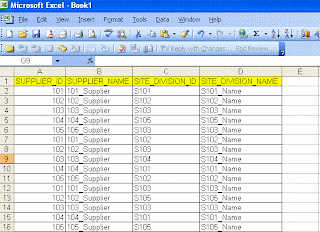
Today one of my team member asked a question where he is looking for an xml from the Excel file and he said it is a one time implementation with the custom format. I thought of sharing with everyone through my blog:
Following is the Excel format:
Following is the output format they are looking for:
<root>
<sup id="101" name="101_Supplier">
<site id="S101">S101_Name</site>
<site id="S102">S102_Name</site>
<site id="S103">S103_Name</site>
</sup>
<sup id="102" name="102_Supplier">
<site id="S102">S102_Name</site>
<site id="S103">S103_Name</site>
<site id="S105">S105_Name</site>
</sup>
</root>
If we observer the xml format it is not a striaght farword, because each suplier has one to many relationship. We can achive it using FOR XML Path in SQL Server 2005 onwards. Here are the steps to follow:
We can create the table in sql server with the same format mentioned in the excel. Here is the sample script after loading the data into the sql server table using export import wizard:
CREATE TABLE [dbo].[SUPDATA](
[SUPPLIER_ID] [varchar](255) COLLATE SQL_Latin1_General_CP1_CI_AS NULL,
[SUPPLIER_NAME] [varchar](255) COLLATE SQL_Latin1_General_CP1_CI_AS NULL,
[SITE_DIVISION_ID] [varchar](255) COLLATE SQL_Latin1_General_CP1_CI_AS NULL,
[SITE_DIVISION_NAME] [varchar](255) COLLATE SQL_Latin1_General_CP1_CI_AS NULL
) ON [PRIMARY]
Following is the query to get the data in the required xml format:
SELECT
SUPPLIER_ID '@id',
SUPPLIER_NAME '@name',
(
SELECT SITE_DIVISION_ID 'site/@id',
SITE_DIVISION_NAME 'site'
FROM SUPDATA I
WHERE I.SUPPLIER_ID = O.SUPPLIER_ID
FOR XML PATH (''), type
)
FROM
(SELECT DISTINCT SUPPLIER_ID, SUPPLIER_NAME FROM dbo.SUPDATA) O
FOR XML path('sup'),root('root')
If you observe carefully in the query, we used type keyword following FOR XML PATH to make sure that the inner query returns xml and should be available without any tag encryption.
This type of queries helps us in converting data into the required xml formats.
1. FOR XML AUTO
2. FOR XML RAW
3. FOR XML EXPLICIT
Using any of these we can get the xml output from a query. We will be using FOR XML Explicit for getting the custom format of the xml, but it is little difficult in writing the query where we have to use set operator "UNION" for the set of queries.
Today one of my team member asked a question where he is looking for an xml from the Excel file and he said it is a one time implementation with the custom format. I thought of sharing with everyone through my blog:
Following is the Excel format:

Following is the output format they are looking for:
<root>
<sup id="101" name="101_Supplier">
<site id="S101">S101_Name</site>
<site id="S102">S102_Name</site>
<site id="S103">S103_Name</site>
</sup>
<sup id="102" name="102_Supplier">
<site id="S102">S102_Name</site>
<site id="S103">S103_Name</site>
<site id="S105">S105_Name</site>
</sup>
</root>
If we observer the xml format it is not a striaght farword, because each suplier has one to many relationship. We can achive it using FOR XML Path in SQL Server 2005 onwards. Here are the steps to follow:
We can create the table in sql server with the same format mentioned in the excel. Here is the sample script after loading the data into the sql server table using export import wizard:
CREATE TABLE [dbo].[SUPDATA](
[SUPPLIER_ID] [varchar](255) COLLATE SQL_Latin1_General_CP1_CI_AS NULL,
[SUPPLIER_NAME] [varchar](255) COLLATE SQL_Latin1_General_CP1_CI_AS NULL,
[SITE_DIVISION_ID] [varchar](255) COLLATE SQL_Latin1_General_CP1_CI_AS NULL,
[SITE_DIVISION_NAME] [varchar](255) COLLATE SQL_Latin1_General_CP1_CI_AS NULL
) ON [PRIMARY]
Following is the query to get the data in the required xml format:
SELECT
SUPPLIER_ID '@id',
SUPPLIER_NAME '@name',
(
SELECT SITE_DIVISION_ID 'site/@id',
SITE_DIVISION_NAME 'site'
FROM SUPDATA I
WHERE I.SUPPLIER_ID = O.SUPPLIER_ID
FOR XML PATH (''), type
)
FROM
(SELECT DISTINCT SUPPLIER_ID, SUPPLIER_NAME FROM dbo.SUPDATA) O
FOR XML path('sup'),root('root')
If you observe carefully in the query, we used type keyword following FOR XML PATH to make sure that the inner query returns xml and should be available without any tag encryption.
This type of queries helps us in converting data into the required xml formats.
Subscribe to:
Posts (Atom)