There are lots scenarios in database procedure we may required to parse the test. Most common scenario is to parse the comma separated text.
For example if we want to get the details of few employees, we will send those employee ids separated by a delimiter as a parameter to the stored procedure.
Till SQL Server 2000 we will be parsing the text character by character and then we will split according to the delimiter.
Following is the general split function which we can use in any version of SQL Server:
Function Code:
set ANSI_NULLS ON
set QUOTED_IDENTIFIER ON
go
ALTER FUNCTION [dbo].[FNSplitString]
(
-- Add the parameters for the function here
@string nvarchar(4000),
@delimiter nvarchar(10)
)
RETURNS
@StringValueTable TABLE
(
-- Add the column definitions for the TABLE variable here
Pos int IDENTITY(1,1),
StringValue nvarchar(4000)
)
AS
BEGIN
-- Fill the table variable with the rows for your result set
DECLARE @delimiterPos int
DECLARE @StringValue nvarchar(4000)
SET @string = @string + @delimiter
-- Loop thru all the characters
WHILE(LEN(@string)>0)
BEGIN
SET @delimiterPos = CHARINDEX(@delimiter,@string)
SET @StringValue = SUBSTRING(@string,0,@delimiterPos)
-- Insert the record into table variable
INSERT INTO @StringValueTable VALUES (@StringValue)
SET @string = SUBSTRING(@string,@delimiterPos+1,LEN(@string))
-- End the loop if there no more elements
IF @delimiterPos = 0
BEGIN
Break
END
END
RETURN
END
Test Sample:
SELECT * FROM [dbo].[FNSplitString]('a,bc,def,ghij,klmno,pqrstu,vw,x,yz',',')
With the new feature "CTE" in SQL Server 2005 and above we can implement the same very easily without any explicit looping mentioned in the above code.
Following is the split function using CTE:
Function Code:
set ANSI_NULLS ON
set QUOTED_IDENTIFIER ON
go
CREATE FUNCTION [dbo].[FNSplitString_New]
(
-- Add the parameters for the function here
@string nvarchar(4000),
@delimiter nvarchar(1)
)
RETURNS
@StringValueTable TABLE
(
-- Add the column definitions for the TABLE variable here
Pos int IDENTITY(1,1),
StringValue nvarchar(4000)
)
AS
BEGIN
Declare @SourceString nvarchar(MAX)
SET @SourceString = ',' + @string + ',';
-- Query using CTE
WITH CTE (Indx, Position) AS
(
SELECT CHARINDEX(@delimiter, @SourceString) Indx, 1 AS Position
UNION ALL
SELECT CHARINDEX(@delimiter, @SourceString, Indx+1) , Position + 1
FROM CTE WHERE CHARINDEX(@delimiter, @SourceString , Indx+1) <> 0
)
INSERT INTO @StringValueTable(StringValue)
SELECT SUBSTRING(@SourceString, B.Indx+1, A.Indx - B.Indx - 1) Val
FROM CTE A INNER JOIN CTE B ON A.Position = B.Position + 1
OPTION (MAXRECURSION 5000)
-- In the above query recursive option is limited to 5000
-- By default it is 100, which means we cannot loop recursively more than 100 times
RETURN
END
Test Sample:
SELECT * FROM [dbo].[FNSplitString_New]('a,bc,def,ghij,klmno,pqrstu,vw,x,yz',',')
In most of our applications we are using first approach as we are reusing from long time. Now we started taking the power of new features like CTE in our regular design and development.
We can also think about passing the 'n' parameter values to a procedure as an xml. And by using XML query capability we can get the individual values as part of the query itself.
Showing posts with label SQL Server 2005. Show all posts
Showing posts with label SQL Server 2005. Show all posts
Wednesday, November 25, 2009

Tuesday, November 17, 2009
SQL Server Table Variables in Transactions
Today in one of the forum I found an intersting question to execute few SQL Statments as not part of the enclosed the transaction.
Let us consider we have a following Scenario:
We have lots of statements participating in the transaction as
Begin Transaction
SQL Inerts Statement 1
Log a message in Log Table
SQL Update Statement 1
Log a message in Log Table
SQL Delete Statement 1
Commit Transaction / Rollback Transaction
In the above block if the transaction is rollbacked then we will be loosing the enteries in Log table too. But if we need the data available in the Log tables without participating in the transaction...
Now the Question is How we can acheive it...?
Immediately after see the question, most of the people thinks about using inner transaction. we have to remember that:
"Committing inner transactions is ignored by the SQL Server Database Engine. The transaction is either committed or rolled back based on the action taken at the end of the outermost transaction. If the outer transaction is committed, the inner nested transactions are also committed. If the outer transaction is rolled back, then all inner transactions are also rolled back, regardless of whether or not the inner transactions were individually committed."
So the Inner/Nested Transaction are ruled out... Now we have to think that is there any way we can get the solution...?
Yes, we can do that by using Local Table Variables. One of the importatnt behaviour of the Local Table Variable will not have any impact of the transaction. Which means irrespective of the Commit/Rollback there will not be any change in the local table variables.
Following the sample demomstrating the same:
-- Create a Sample Table to test
Create Table tblSample(col1 varchar(10))
-- declare log table variable
Declare @Tbl table(Col1 varchar(10))
--
Begin TRansaction
-- Insert Data into table variable
INSERT INTO @Tbl values ('A11')
-- Insert data into actual table
INSERT INTO tblSample
SELECT * FROM
(
Select 'A' Col1
UNION ALL
Select 'B' Col1
) T
-- Insert data into table variable
INSERT INTO @Tbl values ('B11')
rollback Transaction
--commit Transaction
SELECT * from @Tbl
SELECT * from tblSample
Run the above block once with rollback and second time with commit transaction, you will find the same data in the log table @tbl.
Hope this provides some additonal info on local table variables and how we can use in these scenarios.
Let us consider we have a following Scenario:
We have lots of statements participating in the transaction as
Begin Transaction
SQL Inerts Statement 1
Log a message in Log Table
SQL Update Statement 1
Log a message in Log Table
SQL Delete Statement 1
Commit Transaction / Rollback Transaction
In the above block if the transaction is rollbacked then we will be loosing the enteries in Log table too. But if we need the data available in the Log tables without participating in the transaction...
Now the Question is How we can acheive it...?
Immediately after see the question, most of the people thinks about using inner transaction. we have to remember that:
"Committing inner transactions is ignored by the SQL Server Database Engine. The transaction is either committed or rolled back based on the action taken at the end of the outermost transaction. If the outer transaction is committed, the inner nested transactions are also committed. If the outer transaction is rolled back, then all inner transactions are also rolled back, regardless of whether or not the inner transactions were individually committed."
So the Inner/Nested Transaction are ruled out... Now we have to think that is there any way we can get the solution...?
Yes, we can do that by using Local Table Variables. One of the importatnt behaviour of the Local Table Variable will not have any impact of the transaction. Which means irrespective of the Commit/Rollback there will not be any change in the local table variables.
Following the sample demomstrating the same:
-- Create a Sample Table to test
Create Table tblSample(col1 varchar(10))
-- declare log table variable
Declare @Tbl table(Col1 varchar(10))
--
Begin TRansaction
-- Insert Data into table variable
INSERT INTO @Tbl values ('A11')
-- Insert data into actual table
INSERT INTO tblSample
SELECT * FROM
(
Select 'A' Col1
UNION ALL
Select 'B' Col1
) T
-- Insert data into table variable
INSERT INTO @Tbl values ('B11')
rollback Transaction
--commit Transaction
SELECT * from @Tbl
SELECT * from tblSample
Run the above block once with rollback and second time with commit transaction, you will find the same data in the log table @tbl.
Hope this provides some additonal info on local table variables and how we can use in these scenarios.
Tuesday, August 18, 2009
XML DML INSERT operation in SQL Server
Recently in one of our project the requirement is to insert element within existing XML which is a column(XML Data type) in a table. In other words we have to insert dynamic xml in another xml. I hear the similar requirement in most of the forums...
We can use one of the XML DML operation "INSERT" - Inserts one or more nodes identified by Expression1 as child nodes or siblings of the node identified by Expression2.
Using this Insert operation we can insert only a static nodes as shown below:
-- Declare Local Variables
DECLARE @MainXML XML
DECLARE @NewXML XML
-- Sample XML with employee information
SET @MainXML = '<employees>
<employee>
<fname>John</fname>
<lname>V</lname>
<desig>SSE</desig>
</employee>
<employee>
<fname>Pascal</fname>
<lname>J</lname>
<desig>SE</desig>
</employee>
<employee>
<fname>Naveen</fname>
<lname>M</lname>
<desig>Engineer</desig>
</employee>
</employees>'
-- Inserting static xml
SET @MainXML.modify('insert (<employee><fname>Test</fname></employee>) as last into (/employees)[1]')
-- To verify the reault
select @MainXML
Now if we want to insert an XML which is available within the local variable @NewXML:
-- Assigning the sample xml to the local variable
SET @NewXML = '<employee><fname>Test</fname></employee>'
Now if we try to insert this xml from the local variable using sql:variable:
SET @MainXML.modify(' insert {sql:variable("@NewXML")} as last into (/employees)[1]')
We will get an error message indicating:
XQuery [modify()]: An expression was expected
In SQL Server 2005 the work around will be:
1. Dynamic Query
2. Combination of the XML DML Operations
Here I am not concentrating on the Dynamic Query approach as it is pretty simple to implement and it may not be a best approach when compared to other.
Following set of queries using DML operation, we can insert XML data from a local variable:
-- Appending both the Main XML and New XML to insert into Main XML with a root node
SET @MainXML = '<root>' + CAST(@MainXML AS VARCHAR(MAX)) + '<new>' + CAST(@NewXML AS VARCHAR(MAX)) + '</new>' + '</root>'
-- Moving employee element from new element to main xml as part of employees element
SET @MainXML.modify(' insert (//new/employee) as last into (/employees)[1]')
-- Deleting the new element
SET @MainXML.modify(' delete (//new)')
-- Steps to move employee element to the end and to delete the root element
SET @MainXML.modify(' insert (//root/employees) after (/root)[1] ')
SET @MainXML.modify(' delete (/root)')
-- Selecting the xml for final verification
SELECT @MainXML
In Summary following is the sample Script in SQL Server 2005 to insert a dynamic XML into another XML:
DECLARE @MainXML XML
DECLARE @NewXML XML
SET @MainXML = '<employees>
<employee>
<fname>John</fname>
<lname>V</lname>
<desig>SSE</desig>
</employee>
<employee>
<fname>Pascal</fname>
<lname>J</lname>
<desig>SE</desig>
</employee>
<employee>
<fname>Naveen</fname>
<lname>M</lname>
<desig>Engineer</desig>
</employee>
</employees>'
SET @NewXML = '<employee><fname>Test</fname></employee>'
SET @MainXML = '<root>' + CAST(@MainXML AS VARCHAR(MAX)) + '<new>' + CAST(@NewXML AS VARCHAR(MAX)) + '</new>' + '</root>'
SET @MainXML.modify(' insert (//new/employee) as last into (/employees)[1]')
SET @MainXML.modify(' delete (//new)')
SET @MainXML.modify(' insert (//root/employees) after (/root)[1] ')
SET @MainXML.modify(' delete (/root)')
SELECT @MainXML
These many steps are not required for SQL Server 2008 as it supports to insert the dynamic XML directly into another XML. Following is the sample script for SQL Server 2008:
DECLARE @MainXML XML
DECLARE @NewXML XML
SET @MainXML = '<employees>
<employee>
<fname>John</fname>
<lname>V</lname>
<desig>SSE</desig>
</employee>
<employee>
<fname>Pascal</fname>
<lname>J</lname>
<desig>SE</desig>
</employee>
<employee>
<fname>Naveen</fname>
<lname>M</lname>
<desig>Engineer</desig>
</employee>
</employees>'
SET @NewXML = '<employee><fname>Test</fname></employee>'
-- One statement in SQL Server 2008 to do all the operation what we mentioned above for SQL Server 2005
SET @MainXML.modify(' insert {sql:variable("@NewXML")} as last into (/employees)[1]')
select @MainXML
This we implemented in most of our applications, hope it will be useful to most of the folks...
We can use one of the XML DML operation "INSERT" - Inserts one or more nodes identified by Expression1 as child nodes or siblings of the node identified by Expression2.
Using this Insert operation we can insert only a static nodes as shown below:
-- Declare Local Variables
DECLARE @MainXML XML
DECLARE @NewXML XML
-- Sample XML with employee information
SET @MainXML = '<employees>
<employee>
<fname>John</fname>
<lname>V</lname>
<desig>SSE</desig>
</employee>
<employee>
<fname>Pascal</fname>
<lname>J</lname>
<desig>SE</desig>
</employee>
<employee>
<fname>Naveen</fname>
<lname>M</lname>
<desig>Engineer</desig>
</employee>
</employees>'
-- Inserting static xml
SET @MainXML.modify('insert (<employee><fname>Test</fname></employee>) as last into (/employees)[1]')
-- To verify the reault
select @MainXML
Now if we want to insert an XML which is available within the local variable @NewXML:
-- Assigning the sample xml to the local variable
SET @NewXML = '<employee><fname>Test</fname></employee>'
Now if we try to insert this xml from the local variable using sql:variable:
SET @MainXML.modify(' insert {sql:variable("@NewXML")} as last into (/employees)[1]')
We will get an error message indicating:
XQuery [modify()]: An expression was expected
In SQL Server 2005 the work around will be:
1. Dynamic Query
2. Combination of the XML DML Operations
Here I am not concentrating on the Dynamic Query approach as it is pretty simple to implement and it may not be a best approach when compared to other.
Following set of queries using DML operation, we can insert XML data from a local variable:
-- Appending both the Main XML and New XML to insert into Main XML with a root node
SET @MainXML = '<root>' + CAST(@MainXML AS VARCHAR(MAX)) + '<new>' + CAST(@NewXML AS VARCHAR(MAX)) + '</new>' + '</root>'
-- Moving employee element from new element to main xml as part of employees element
SET @MainXML.modify(' insert (//new/employee) as last into (/employees)[1]')
-- Deleting the new element
SET @MainXML.modify(' delete (//new)')
-- Steps to move employee element to the end and to delete the root element
SET @MainXML.modify(' insert (//root/employees) after (/root)[1] ')
SET @MainXML.modify(' delete (/root)')
-- Selecting the xml for final verification
SELECT @MainXML
In Summary following is the sample Script in SQL Server 2005 to insert a dynamic XML into another XML:
DECLARE @MainXML XML
DECLARE @NewXML XML
SET @MainXML = '<employees>
<employee>
<fname>John</fname>
<lname>V</lname>
<desig>SSE</desig>
</employee>
<employee>
<fname>Pascal</fname>
<lname>J</lname>
<desig>SE</desig>
</employee>
<employee>
<fname>Naveen</fname>
<lname>M</lname>
<desig>Engineer</desig>
</employee>
</employees>'
SET @NewXML = '<employee><fname>Test</fname></employee>'
SET @MainXML = '<root>' + CAST(@MainXML AS VARCHAR(MAX)) + '<new>' + CAST(@NewXML AS VARCHAR(MAX)) + '</new>' + '</root>'
SET @MainXML.modify(' insert (//new/employee) as last into (/employees)[1]')
SET @MainXML.modify(' delete (//new)')
SET @MainXML.modify(' insert (//root/employees) after (/root)[1] ')
SET @MainXML.modify(' delete (/root)')
SELECT @MainXML
These many steps are not required for SQL Server 2008 as it supports to insert the dynamic XML directly into another XML. Following is the sample script for SQL Server 2008:
DECLARE @MainXML XML
DECLARE @NewXML XML
SET @MainXML = '<employees>
<employee>
<fname>John</fname>
<lname>V</lname>
<desig>SSE</desig>
</employee>
<employee>
<fname>Pascal</fname>
<lname>J</lname>
<desig>SE</desig>
</employee>
<employee>
<fname>Naveen</fname>
<lname>M</lname>
<desig>Engineer</desig>
</employee>
</employees>'
SET @NewXML = '<employee><fname>Test</fname></employee>'
-- One statement in SQL Server 2008 to do all the operation what we mentioned above for SQL Server 2005
SET @MainXML.modify(' insert {sql:variable("@NewXML")} as last into (/employees)[1]')
select @MainXML
This we implemented in most of our applications, hope it will be useful to most of the folks...
Thursday, July 30, 2009
SQL Server Database Backups using SMO in C#
In the previous post we looked at the What is SMO and where we can use SMO. Now we will see how we can use SMO for taking SQL Server Database backups in C# code.
The first step in our code is to estblish the connection to the database. In our regular .net applications we will use SqlConnection for connecting to the database server. In SMO APIs we will be using the class called "Server" as shown below:
Microsoft.SqlServer.Management.Smo.Server objSrv = new Server("Database Server Name");
if we are planning to connect to any particular instance, we can even pass the instance name as part of the database server name as:
Microsoft.SqlServer.Management.Smo.Server objSrv = new Server("Database Server Name\\Instance Name");
With this line we will be establishing the connectivity to the database server. To get any information about the server, we can use this object. For example to get the SQL Server edition like Enterprise/Standard/Developer edition, we can use Information property within the Server object as shown below:
String sEdition = objSrv.Information.Edition;
Using this Information class we can get lots of information about the SQL Server like OSVersion, Collation, CaseSensitive, Clustered, Physical Memory and Version etc.
Next step for us is to create the instance of the Backup class which is core part for taking the backup of the database:
Microsoft.SqlServer.Management.Smo.Backup objBkpUp = new Backup();
There is should some option to provide details like Database Name, Backup Options (Database/Log File/Data File). The option is nothing but the Backup class as shown below:
objBkpUp.Action = BackupActionType.Database;
objBkpUp.Database = "MyDataBase";
objBkpUp.MediaName = "FileSystem";
And also we have to provide the info about the Device (File/Tape/Pipe) for taking the backup. For this we will be using the BackupDeviceItem class.
BackupDeviceItem objBkpDeviceItem = new BackupDeviceItem();
objBkpDeviceItem.DeviceType = DeviceType.File;
objBkpDeviceItem.Name = "C:\\filename.bak";
Once device is created we have to add it to the Backup instance as:
objBkpUp.Devices.Add(objBkpDeviceItem);
Finally we are ready to initiate a call for the backup operation by passing the Server instance:
objBkpUp.Initialize = true;
objBkpUp.SqlBackup(objSrv);
Here is the complete code:
Microsoft.SqlServer.Management.Smo.Backup objBkpUp = new Backup();
Microsoft.SqlServer.Management.Smo.Server objSrv = new Server("DBName");
Console.WriteLine("Server Edition: " + objSrv.Information.Edition);
objBkpUp.Action = BackupActionType.Database;
objBkpUp.Database = "MyDataBase";
objBkpUp.MediaName = "FileSystem";
BackupDeviceItem objBkpDeviceItem = new BackupDeviceItem();
objBkpDeviceItem.DeviceType = DeviceType.File;
objBkpDeviceItem.Name = "h:\\zzTest.bak";
objBkpUp.Devices.Add(objBkpDeviceItem);
objBkpUp.Initialize = true;
objBkpUp.SqlBackup(objSrv);
Please note that we have to add the following assembly references:
Microsoft.SqlServer.Smo
Microsoft.SqlServer.ConnectionInfo
and in the code we have to refer following namespace:
using Microsoft.SqlServer.Management.Smo;
The first step in our code is to estblish the connection to the database. In our regular .net applications we will use SqlConnection for connecting to the database server. In SMO APIs we will be using the class called "Server" as shown below:
Microsoft.SqlServer.Management.Smo.Server objSrv = new Server("Database Server Name");
if we are planning to connect to any particular instance, we can even pass the instance name as part of the database server name as:
Microsoft.SqlServer.Management.Smo.Server objSrv = new Server("Database Server Name\\Instance Name");
With this line we will be establishing the connectivity to the database server. To get any information about the server, we can use this object. For example to get the SQL Server edition like Enterprise/Standard/Developer edition, we can use Information property within the Server object as shown below:
String sEdition = objSrv.Information.Edition;
Using this Information class we can get lots of information about the SQL Server like OSVersion, Collation, CaseSensitive, Clustered, Physical Memory and Version etc.
Next step for us is to create the instance of the Backup class which is core part for taking the backup of the database:
Microsoft.SqlServer.Management.Smo.Backup objBkpUp = new Backup();
There is should some option to provide details like Database Name, Backup Options (Database/Log File/Data File). The option is nothing but the Backup class as shown below:
objBkpUp.Action = BackupActionType.Database;
objBkpUp.Database = "MyDataBase";
objBkpUp.MediaName = "FileSystem";
And also we have to provide the info about the Device (File/Tape/Pipe) for taking the backup. For this we will be using the BackupDeviceItem class.
BackupDeviceItem objBkpDeviceItem = new BackupDeviceItem();
objBkpDeviceItem.DeviceType = DeviceType.File;
objBkpDeviceItem.Name = "C:\\filename.bak";
Once device is created we have to add it to the Backup instance as:
objBkpUp.Devices.Add(objBkpDeviceItem);
Finally we are ready to initiate a call for the backup operation by passing the Server instance:
objBkpUp.Initialize = true;
objBkpUp.SqlBackup(objSrv);
Here is the complete code:
Microsoft.SqlServer.Management.Smo.Backup objBkpUp = new Backup();
Microsoft.SqlServer.Management.Smo.Server objSrv = new Server("DBName");
Console.WriteLine("Server Edition: " + objSrv.Information.Edition);
objBkpUp.Action = BackupActionType.Database;
objBkpUp.Database = "MyDataBase";
objBkpUp.MediaName = "FileSystem";
BackupDeviceItem objBkpDeviceItem = new BackupDeviceItem();
objBkpDeviceItem.DeviceType = DeviceType.File;
objBkpDeviceItem.Name = "h:\\zzTest.bak";
objBkpUp.Devices.Add(objBkpDeviceItem);
objBkpUp.Initialize = true;
objBkpUp.SqlBackup(objSrv);
Please note that we have to add the following assembly references:
Microsoft.SqlServer.Smo
Microsoft.SqlServer.ConnectionInfo
and in the code we have to refer following namespace:
using Microsoft.SqlServer.Management.Smo;
Wednesday, July 29, 2009
What is SMO?
Are we wondering what is this SMO...?
Recently one of our team member asked me a question on who we can write a C# code for taking a SQL Server Database Bakup without using "Backup Database" sql command which made me to write this post.
SMO is Sql Server Management Objects providing a set of APIs for managing SQL Server.
In a short note:
"It is a collection of objects that are designed for programming all the aspects of Managing the Microsoft SQL Server"
And also we can say that SMO is a replacement of SQL-DMO(SQL Server Distributed Management Objects). SMO design goal is to mainly improve Scalability and Performance when compared to the SQL-DMO which is available with SQL Server 2000. SMO is relaced with SQL Server 2005 and even it supports SQL Server 2000 as well.
We can use SMO to perform any of the following administrative operations on the SQL Server:
Create databases
Perform backups
Create jobs
Configure SQL Server
Assign permissions
and to perform many other administrative tasks.
Following are the set of Assemblies available for the programming:
Microsoft.SqlServer.management
Microsoft.SqlServer.Management.NotificationServices
Microsoft.SqlServer.Management.Smo
Microsoft.SqlServer.Management.Smo.Agent
Microsoft.SqlServer.Management.Smo.Broker
Microsoft.SqlServer.Management.Smo.Mail
Microsoft.SqlServer.Management.Smo.RegisteredServers
Microsoft.SqlServer.Management.Smo.Wmi
Microsoft.SqlServer.Management.Trace namespaces
In the comming post I will explain few set of Objects and how can we write simple program in C# to backup a particular database using SMO APIs.
Recently one of our team member asked me a question on who we can write a C# code for taking a SQL Server Database Bakup without using "Backup Database" sql command which made me to write this post.
SMO is Sql Server Management Objects providing a set of APIs for managing SQL Server.
In a short note:
"It is a collection of objects that are designed for programming all the aspects of Managing the Microsoft SQL Server"
And also we can say that SMO is a replacement of SQL-DMO(SQL Server Distributed Management Objects). SMO design goal is to mainly improve Scalability and Performance when compared to the SQL-DMO which is available with SQL Server 2000. SMO is relaced with SQL Server 2005 and even it supports SQL Server 2000 as well.
We can use SMO to perform any of the following administrative operations on the SQL Server:
and to perform many other administrative tasks.
Following are the set of Assemblies available for the programming:
In the comming post I will explain few set of Objects and how can we write simple program in C# to backup a particular database using SMO APIs.
Monday, July 27, 2009
How to get deep nested elements in SQL Queries using FOR XML PATH
Recently in one of the forums I came across this question.
How can we have deep nested elements in the xml when we are using FOR XML PATH in a SQL Query.
For example the following query
SELECT 'value' AS 'orderdatabase/allorders/customer/information/orderaddress/shippingaddress/address1/home/address1/blahblahblahblahblahblahblahblah'
FOR XML PATH('')
will give an error indicating that the identifier is too long and it should not exceed 128 characters. But the output expected from the query is:
<root>
<orderdatabase>
<allorders>
<customer>
<information>
<orderaddress>
<shippingaddress>
<address1>
<home>
<address1>
<blahblahblahblahblahblahblahblah>value</blahblahblahblahblahblahblahblah>
</address1>
</home>
</address1>
</shippingaddress>
</orderaddress>
</information>
</customer>
</allorders>
</orderdatabase>
</root>
In most of the scenarios in our real world code this might be required. We can resolve this with a workaround using sub queries which will return an xml which is subset of the parent xml. Following is the sample query to resolve the above issue:
SELECT '' 'orderdatabase/allorders/customer/information/orderaddress',
(
SELECT 'value' 'shippingaddress/address1/home/address1/blahblahblahblahblahblahblahblah'
FOR XML PATH(''), type
) AS 'orderdatabase/allorders/customer/information/orderaddress'
FOR XML PATH(''),root('root')
We can refer any of the sql table columns using {sql:column("column name")}.
This is a simple tip/work around for long nested xml's from a query.
How can we have deep nested elements in the xml when we are using FOR XML PATH in a SQL Query.
For example the following query
SELECT 'value' AS 'orderdatabase/allorders/customer/information/orderaddress/shippingaddress/address1/home/address1/blahblahblahblahblahblahblahblah'
FOR XML PATH('')
will give an error indicating that the identifier is too long and it should not exceed 128 characters. But the output expected from the query is:
<root>
<orderdatabase>
<allorders>
<customer>
<information>
<orderaddress>
<shippingaddress>
<address1>
<home>
<address1>
<blahblahblahblahblahblahblahblah>value</blahblahblahblahblahblahblahblah>
</address1>
</home>
</address1>
</shippingaddress>
</orderaddress>
</information>
</customer>
</allorders>
</orderdatabase>
</root>
In most of the scenarios in our real world code this might be required. We can resolve this with a workaround using sub queries which will return an xml which is subset of the parent xml. Following is the sample query to resolve the above issue:
SELECT '' 'orderdatabase/allorders/customer/information/orderaddress',
(
SELECT 'value' 'shippingaddress/address1/home/address1/blahblahblahblahblahblahblahblah'
FOR XML PATH(''), type
) AS 'orderdatabase/allorders/customer/information/orderaddress'
FOR XML PATH(''),root('root')
We can refer any of the sql table columns using {sql:column("column name")}.
This is a simple tip/work around for long nested xml's from a query.
How to use Multiple DataReaders in ADO.Net
Most of the folks says that we cannot use one more DataReader when one DataReader is Opened. It is obsolutely correct upto ADO.Net 1.0 version.
With ADO.Net 2.0 we can create DataReader while another DataReader is opened on the same SqlConnection.
Please note that the second DataReader should use the same SqlConnection.
Following is the sample to demonstrate the same (in C#):
static void Main(string[] args)
{
SqlConnection objCon = null;
try
{
string sConString = "Data Source=.\\sqlexpress;Initial Catalog=DB1;Integrated Security=True;MultipleActiveResultSets=true";
SqlDataReader dr1 = null, dr2 = null;
objCon = new SqlConnection();
objCon.ConnectionString = sConString;
SqlCommand objCmd = new SqlCommand();
objCmd.CommandText = "select top 10 * from Page";
objCmd.Connection = objCon;
SqlCommand objCmd1 = new SqlCommand();
objCmd1.Connection = objCon;
objCon.Open();
dr1 = objCmd.ExecuteReader();
while (dr1.Read())
{
Console.WriteLine(dr1.GetInt32(0).ToString());
objCmd1.CommandText = "select top 10 * from PageData Where PageId=" + dr1.GetInt32(0).ToString();
// Creating the Second DataReader
dr2 = objCmd1.ExecuteReader();
while (dr2.Read())
{
Console.WriteLine(dr2.GetInt32(1));
}
// Closing the Data Reader
dr2.Close();
}
// Closing the Data Reader
dr1.Close();
}
catch (Exception objExp)
{
Console.WriteLine("Exception: " + objExp.Message);
}
finally
{
if (objCon != null)
{
objCon.Close();
}
}
}
Please note that in the Connection String we have to add "MultipleActiveResultSets=true" for allowing mutiple DataReaders on the same Connection.
With ADO.Net 2.0 we can create DataReader while another DataReader is opened on the same SqlConnection.
Please note that the second DataReader should use the same SqlConnection.
Following is the sample to demonstrate the same (in C#):
static void Main(string[] args)
{
SqlConnection objCon = null;
try
{
string sConString = "Data Source=.\\sqlexpress;Initial Catalog=DB1;Integrated Security=True;MultipleActiveResultSets=true";
SqlDataReader dr1 = null, dr2 = null;
objCon = new SqlConnection();
objCon.ConnectionString = sConString;
SqlCommand objCmd = new SqlCommand();
objCmd.CommandText = "select top 10 * from Page";
objCmd.Connection = objCon;
SqlCommand objCmd1 = new SqlCommand();
objCmd1.Connection = objCon;
objCon.Open();
dr1 = objCmd.ExecuteReader();
while (dr1.Read())
{
Console.WriteLine(dr1.GetInt32(0).ToString());
objCmd1.CommandText = "select top 10 * from PageData Where PageId=" + dr1.GetInt32(0).ToString();
// Creating the Second DataReader
dr2 = objCmd1.ExecuteReader();
while (dr2.Read())
{
Console.WriteLine(dr2.GetInt32(1));
}
// Closing the Data Reader
dr2.Close();
}
// Closing the Data Reader
dr1.Close();
}
catch (Exception objExp)
{
Console.WriteLine("Exception: " + objExp.Message);
}
finally
{
if (objCon != null)
{
objCon.Close();
}
}
}
Please note that in the Connection String we have to add "MultipleActiveResultSets=true" for allowing mutiple DataReaders on the same Connection.
Monday, July 20, 2009
Custom XML from a Query
Most of us knows that SQL Server 2000 supports following xml clause:
1. FOR XML AUTO
2. FOR XML RAW
3. FOR XML EXPLICIT
Using any of these we can get the xml output from a query. We will be using FOR XML Explicit for getting the custom format of the xml, but it is little difficult in writing the query where we have to use set operator "UNION" for the set of queries.
Today one of my team member asked a question where he is looking for an xml from the Excel file and he said it is a one time implementation with the custom format. I thought of sharing with everyone through my blog:
Following is the Excel format:
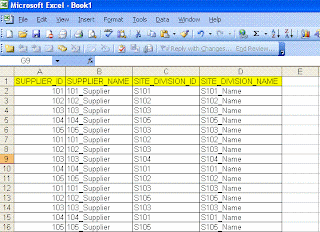
Following is the output format they are looking for:
<root>
<sup id="101" name="101_Supplier">
<site id="S101">S101_Name</site>
<site id="S102">S102_Name</site>
<site id="S103">S103_Name</site>
</sup>
<sup id="102" name="102_Supplier">
<site id="S102">S102_Name</site>
<site id="S103">S103_Name</site>
<site id="S105">S105_Name</site>
</sup>
</root>
If we observer the xml format it is not a striaght farword, because each suplier has one to many relationship. We can achive it using FOR XML Path in SQL Server 2005 onwards. Here are the steps to follow:
We can create the table in sql server with the same format mentioned in the excel. Here is the sample script after loading the data into the sql server table using export import wizard:
CREATE TABLE [dbo].[SUPDATA](
[SUPPLIER_ID] [varchar](255) COLLATE SQL_Latin1_General_CP1_CI_AS NULL,
[SUPPLIER_NAME] [varchar](255) COLLATE SQL_Latin1_General_CP1_CI_AS NULL,
[SITE_DIVISION_ID] [varchar](255) COLLATE SQL_Latin1_General_CP1_CI_AS NULL,
[SITE_DIVISION_NAME] [varchar](255) COLLATE SQL_Latin1_General_CP1_CI_AS NULL
) ON [PRIMARY]
Following is the query to get the data in the required xml format:
SELECT
SUPPLIER_ID '@id',
SUPPLIER_NAME '@name',
(
SELECT SITE_DIVISION_ID 'site/@id',
SITE_DIVISION_NAME 'site'
FROM SUPDATA I
WHERE I.SUPPLIER_ID = O.SUPPLIER_ID
FOR XML PATH (''), type
)
FROM
(SELECT DISTINCT SUPPLIER_ID, SUPPLIER_NAME FROM dbo.SUPDATA) O
FOR XML path('sup'),root('root')
If you observe carefully in the query, we used type keyword following FOR XML PATH to make sure that the inner query returns xml and should be available without any tag encryption.
This type of queries helps us in converting data into the required xml formats.
1. FOR XML AUTO
2. FOR XML RAW
3. FOR XML EXPLICIT
Using any of these we can get the xml output from a query. We will be using FOR XML Explicit for getting the custom format of the xml, but it is little difficult in writing the query where we have to use set operator "UNION" for the set of queries.
Today one of my team member asked a question where he is looking for an xml from the Excel file and he said it is a one time implementation with the custom format. I thought of sharing with everyone through my blog:
Following is the Excel format:

Following is the output format they are looking for:
<root>
<sup id="101" name="101_Supplier">
<site id="S101">S101_Name</site>
<site id="S102">S102_Name</site>
<site id="S103">S103_Name</site>
</sup>
<sup id="102" name="102_Supplier">
<site id="S102">S102_Name</site>
<site id="S103">S103_Name</site>
<site id="S105">S105_Name</site>
</sup>
</root>
If we observer the xml format it is not a striaght farword, because each suplier has one to many relationship. We can achive it using FOR XML Path in SQL Server 2005 onwards. Here are the steps to follow:
We can create the table in sql server with the same format mentioned in the excel. Here is the sample script after loading the data into the sql server table using export import wizard:
CREATE TABLE [dbo].[SUPDATA](
[SUPPLIER_ID] [varchar](255) COLLATE SQL_Latin1_General_CP1_CI_AS NULL,
[SUPPLIER_NAME] [varchar](255) COLLATE SQL_Latin1_General_CP1_CI_AS NULL,
[SITE_DIVISION_ID] [varchar](255) COLLATE SQL_Latin1_General_CP1_CI_AS NULL,
[SITE_DIVISION_NAME] [varchar](255) COLLATE SQL_Latin1_General_CP1_CI_AS NULL
) ON [PRIMARY]
Following is the query to get the data in the required xml format:
SELECT
SUPPLIER_ID '@id',
SUPPLIER_NAME '@name',
(
SELECT SITE_DIVISION_ID 'site/@id',
SITE_DIVISION_NAME 'site'
FROM SUPDATA I
WHERE I.SUPPLIER_ID = O.SUPPLIER_ID
FOR XML PATH (''), type
)
FROM
(SELECT DISTINCT SUPPLIER_ID, SUPPLIER_NAME FROM dbo.SUPDATA) O
FOR XML path('sup'),root('root')
If you observe carefully in the query, we used type keyword following FOR XML PATH to make sure that the inner query returns xml and should be available without any tag encryption.
This type of queries helps us in converting data into the required xml formats.
Sunday, August 3, 2008
What is Synonyms in SQL Server 2005?
Before starting what is Synonym, let us consider the following scenarios...
Scenario - 1
When we want to access data from a different database, we will write some thing like
SELECT * FROM Schema_Name.dbo.Table_Name
We may be using the above statement in lots of procedures/functins/triggers.
When we want to move our to code different server(may be from Dev to QA/Prod)
again we have to go and change all the statement by replaceing Dev Schema_Name with the QA or Prod Schema Name.
May be as a developer we may felt that how can we change in all the place by changing at one location.
Scenario-2
There might be lots of places where we don't want to expose table names to the other users.
Currently in 2000 we have to create a view irrespective of any where clause.
like this there might be lots of scenarios...:)
To solve all these, we will use SYNONYMs.
Now we will see what is a SYNONYM:
A synonym is just an alternate name for an existing database object that keeps a database user (more likely, a database programmer) from having to use a multipart name for an object.
Synonyms can be defined on a two-part, three-part, or four-part SQL Server object name.
Here is the Syntax for creating a SYNONYM
CREATE SYNONYM [schema_name.]synonym_name FOR object_name
Example:
CREATE SYNONYM emp_syn FOR TestDB.dbo.emp
Now we can access the data from the emp table by using the synonym as follows:
SELECT * FROM emp_syn
A synonym can be defined by the following database objects:
Table
View
Stored procedure
User-defined function
Extend stored procedure
Replication filter procedure
CLR stored procedures
CLR functions
Although synonyms can be created on a multipart object name, they are scoped to the database that they are created.
SYNONYMs can be droped as similar to the droping any other object. Here is the syntax:
DROP SYNONYM
There is no ALTER statement for Synonym.
In order to change the SYNONYM we have drop and recreate it again.
Scenario - 1
When we want to access data from a different database, we will write some thing like
SELECT * FROM Schema_Name.dbo.Table_Name
We may be using the above statement in lots of procedures/functins/triggers.
When we want to move our to code different server(may be from Dev to QA/Prod)
again we have to go and change all the statement by replaceing Dev Schema_Name with the QA or Prod Schema Name.
May be as a developer we may felt that how can we change in all the place by changing at one location.
Scenario-2
There might be lots of places where we don't want to expose table names to the other users.
Currently in 2000 we have to create a view irrespective of any where clause.
like this there might be lots of scenarios...:)
To solve all these, we will use SYNONYMs.
Now we will see what is a SYNONYM:
A synonym is just an alternate name for an existing database object that keeps a database user (more likely, a database programmer) from having to use a multipart name for an object.
Synonyms can be defined on a two-part, three-part, or four-part SQL Server object name.
Here is the Syntax for creating a SYNONYM
CREATE SYNONYM [schema_name.]synonym_name FOR object_name
Example:
CREATE SYNONYM emp_syn FOR TestDB.dbo.emp
Now we can access the data from the emp table by using the synonym as follows:
SELECT * FROM emp_syn
A synonym can be defined by the following database objects:
Table
View
Stored procedure
User-defined function
Extend stored procedure
Replication filter procedure
CLR stored procedures
CLR functions
Although synonyms can be created on a multipart object name, they are scoped to the database that they are created.
SYNONYMs can be droped as similar to the droping any other object. Here is the syntax:
DROP SYNONYM
There is no ALTER statement for Synonym.
In order to change the SYNONYM we have drop and recreate it again.
Subscribe to:
Posts (Atom)